

Free Serial Port Monitor
With a free Serial Port Logger, you can easily read the incoming serial data from up to 256 real and virtual RS232 ports and save it to a specified text file for later serial packet analysis.
- Monitor all data received by your local COM ports
- Read serial data from up to 256 serial ports simultaneously
- Run Free Serial Data Logger under your virtual machine

Advanced Serial Port Monitor
Serial Port Monitor is a professional solution that makes it possible to sniff data transmitted in and out of a COM port you are testing. This powerful utility can connect to RS232, RS422 and RS485 ports, even if they are already opened by some other apps, and capture data exchanged via these interfaces.
- Monitor communications with any type of serial software and hardware
- Record data from any number of COM ports at a time
- View captured serial data in different formats
- Work with RS232, RS422, and RS485 communication ports
- Sniff and decode Modbus RTU and Modbus ASCII data

Download Advanced Serial Port Terminal for absolutely free
This lightweight software application will help you send a wide variety of commands to serial ports, receive their responses and view this data in different formats.
Request a free license

Serial Port Monitor Integration
Whether you're looking at embedded Serial Port Monitor solution as a part of your product you can consider Serial Port Monitor ActiveX as a component for implementation.
Find out more about SMP AX
Free Serial Port Monitor overview
The software is designed to assist you in analyzing communications established between a computer and connected serial equipment.
-

COM port data logging
FREE Serial Port Monitor has a simple interface, so to begin serial logging, you just need to select a serial port, choose where to file serial communication data, define RS232 port's parameters and click "Start". -

Working in a virtual environment
FREE Serial Port Monitor can be installed and used under virtual machines, like VMware or Hyper-V. Such functionality can be successfully used for testing. Our serial port logger is great for learning purposes, too. -

Collecting serial data in real time
When you attach COM-based devices, like scales, meters, barcode scanners, etc. to an RS232 port of your computer, FREE Serial Port Monitor lets you connect to this port and collect data it receives from the serial equipment. With FREE Serial Port Monitor, it's simple to see and learn how serial ports work!
Serial Port Monitor overview
Serial Port Monitor is a highly-functional and friendly utility that works with RS232/RS422/RS485 ports and allows you to save a lot of your time while developing and testing serial applications and hardware. It offers the full set of advanced port monitoring features, including a built-in terminal, unique data filtering options, convenient data viewing modes, session playback capability, and more.
-
Analyzing COM port data
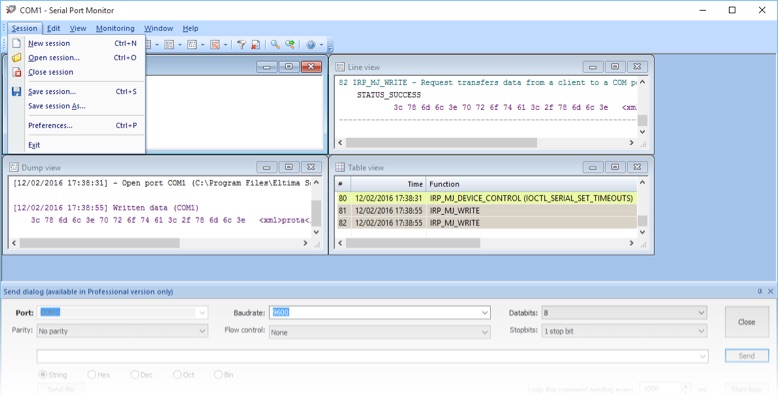
If a COM port you want to monitor is already opened by a third-party application, Serial Port Analyzer will still be able to connect to it and record its activity. It will capture the port’s data and display it to you. Serial Analyzer software will let you select whether to show serial data in the Table, Line, Dump or Terminal mode. Also, you can enable all available visualizers at a time. -
Data viewing modes
With the Table view, you get the data in the form of a table consisting of the recorded IRPs. When you select the Line view, you will see more details about each request passing in and out of a monitored COM port. The Dump view will display all incoming and outgoing data in hexadecimal and string formats as a data dump. In the Terminal mode, the monitoring data will be shown as ASCII characters. -
Saving data to a file
All captured data, including serial input/output control codes (IOCTLs) with full details, can be recorded to a selected file. Also, you can save your monitoring session and load it next time you need it. Serial Port Monitor software allows reading serial port data in real time, which means you’ll be able to solve any problem immediately after it occurs. -
Monitoring of multiple ports
Serial Port Sniffer lets you test an unlimited number of COM ports within one RS232 monitoring session. Just select “Start session” in the main menu of the app and get the ability to track the communications of any serial program with several devices at a time. All data will be recorded using the first-in, first-out method, which makes it more convenient for analysis. -
Sending commands via a terminal
With RS232 monitor software, you can not only log serial traffic but also emulate sending data to a particular serial port as though it were sent from the monitored app. This enables you to easily check how a device connected to this port reacts to specific data. -
Parsing of Modbus RTU/Modbus ASCII
The Modbus Sniffer makes it possible to perform monitoring and analysis of Modbus communications. It allows intercepting Modbus RTU and Modbus ASCII frames exchanged between Modbus-enabled devices or apps.
Feature list comparison
Check out the main differences in feature packs of free open source and advanced versions
| # | Options | Free | Advanced |
|---|---|---|---|
| 1 | Support for RS232 ports | ||
| 2 | Compatibility with RS422, RS485 ports | ||
| 3 | Reading COM port data and saving it to a file | ||
| 4 | Logging data from any number of serial ports at a time | ||
| 5 | Capturing all data received by a COM port | ||
| 6 | The possibility to add several ports for monitoring in one session | ||
| 7 | Support for all baud rates | ||
| 8 | Search options | ||
| 9 | Filtering of recorded IPRs | ||
| 10 | Availability of several data viewing modes |
Frequently asked questions about
Serial Port Monitor
Serial Port Monitor displays, logs and analyzes serial communication.
To start a serial monitoring session download and launch Serial Port Monitor. Then click ‘Start monitoring’ to initiate the monitoring session.
To start a serial monitoring session download and launch Serial Port Monitor. Then click ‘Start monitoring’ to initiate the monitoring session.
Yes, Serial Port Monitor lets you monitor an unlimited number of serial ports at a time. All you need to do is to launch a new instance of the software for every new COM port interface.
Serial Port Tester is a professional software that comes with a slew of powerful features, including advanced filtering and search options, built-in terminal, convenient data visualizers, the ability to record serial communication data to a file.


#1 at Serial Port Software
Serial Port Monitor
Log and analyze serial port activity
Get a download link for your desktop
Submit your email address to get a link for quick download on your desktop and get started!
Submit your email address to get a link for quick download on your desktop and get started!
or
Information
Requirements: , 9.87MB free space
Category: Serial Port Software
Demo limitations:
fully functional 14-day trial
Pricing: Starts from $59
Languages:
English
The registered users of the previous version can upgrade with a 50% discount. Learn more
Our customers love us