2. YAT (Yet Another Terminal)
Platform: Windows (7/8/10/11)
License: Open Source (GNU GPLv3)
YAT is a feature-rich absolute free open-source terminal emulator and serial port monitor specifically designed for engineering and debugging, rather than basic serial communication. It is often cited as a functional replacement for HyperTerminal. YAT stands out by offering complex command sequencing, customizable formatting for non-displayable ASCII characters, and automated responses, which makes it a great choice for advanced users compared to basic loggers.
.jpg "YAT (Yet Another Terminal)")
Key Advantages of the Free Version
- Broad Protocol Compatibility: YAT seamlessly supports various protocols, including RS-422, RS-485, RS-232, TCP/IP (client/server), and UDP, without interruptions.
- Professional-grade Formatting: It presents non-displayable characters, such as LF, NULL, and CR, as understandable mnemonics, essential for protocol debugging.
- Built-in Commands: The software comes with preset commands that enable users to create "Send Panels," improving workflow performance and simplifying repetitive tasks.
- Robust Logging: YAT offers precise millisecond timestamping and allows for clear visibility by isolating transmitted data from captured data.
- Self-executing Actions: The software allows users to set up triggers, enabling automated responses based on specific received strings.
Key Limitations of the Free Version
- Steep Learning Curve: The large number of customizable settings can make the interface challenging for absolute beginners.
- Windows Only: YAT is only available on the Windows platform, and it depends on the .NET Framework, which may not be ideal for all users.
- Port Ownership: Unlike a "kernel-mode sniffer," YAT typically requires the tool to own the port to function fully, which may limit its functionality in certain use cases.
Use Cases
- Embedded Software Development: Ideal for troubleshooting microcontrollers (e.g., Arduino, STM32, ESP32) that require accurate timing and precise control character handling.
- Testing Industrial Protocols: Perfect for validating correct communication logic in systems like SCADA or PLC.
- Long-Term Performance: A dependable open-source tool for environments that require no expiration or unexpected subscription costs.
3. HHD Software Free Serial Analyzer
Platform: Windows
License: Free edition (proprietary, usage-limited, but no payment required)
HHD Software Free Serial Analyzer is a non-intrusive and driver-based serial sniffer that uses a monitoring driver to intercept serial I/O requests. It is specifically built for fine-grained, low-level visibility. It thoroughly observes traffic and configuration requests regardless of whether another application is currently using the port.
In exchange, the free edition imposes strict time and session limits, and its workflow/UI feels more “driver-level” than standard terminal-style serial tools.
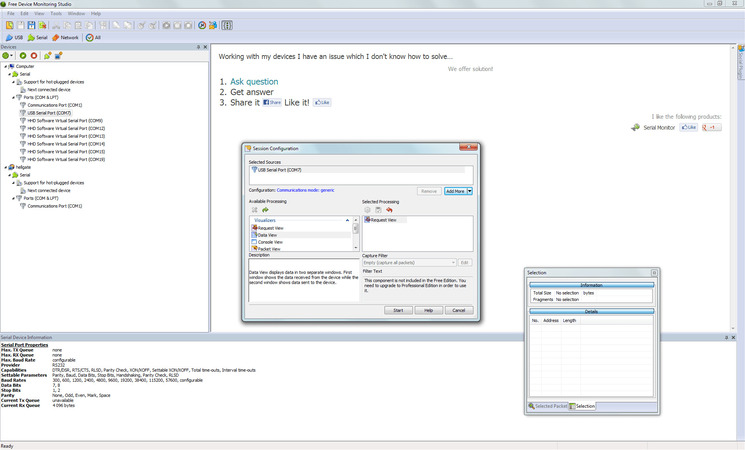
Key Advantages of the Free Version
- Non-intrusive sniffing via a driver-based approach: The software records serial traffic using a monitoring driver while leaving your application workflow unchanged.
- Control and settings transparency: The software easily interprets and presents serial I/O control, even in IOCTL-heavy scenarios, which is valuable for driver-level troubleshooting.
Key Limitations in the Free Version
- Session length is limited to a maximum of 20 minutes
- Limited to a maximum of 5 sessions per day
Use Cases
- Ideal for low-level troubleshooting that requires a sniffer-style monitoring rather than a simple terminal view
- Analyzing configuration or control behavior, particularly in IOCTL-heavy environments
- Understanding how software interacts with the port while another application owns a COM port
PRO Version
HHD Software offers another paid software, Serial Port Monitor, which lifts the restrictions found in the free version of Free Serial Analyzer. The paid version removes session limits, extends usage time, and provides advanced protocol decoders such as Modbus RTU/ASCII. It also includes additional enhancements like extended data analysis, more robust logging features, and customizable analysis tools. Depending on the edition, users can gain access to professional-grade functionality for more comprehensive troubleshooting and serial port analysis.
4. SerialTool (Free version)
Platform: Windows, macOS, Linux
License: Free + PRO available (freemium)
SerialTool is another cross-platform serial monitoring and utility tool. It runs across Windows, macOS, and Linux in a similar manner and provides a necessary free-tier tooling, such as limited Modbus support and scripting. The main limitation is that the tool has limited configuration and programming capabilities in its free tier, and its advanced-tier modules depend on the platform or edition.
.jpg "SerialTool (Free version)")
Key Free Version Features with Limitations
- Up to 2 serial ports at once
- Python scripting: 3 runs per session
- Modbus client: 5 packets
- Virtual COM ports: 1 pair
- More capped features: SerialScope (120s), USBMap (1 time), scheduled sends (9 times), buffers (2), and additional usage caps across modules
Use Cases
- Ideal for cross-platform projects on Arduino, Raspberry Pi, and similar development boards, providing a single tool that runs on all major OSes.
- Basic Modbus testing and scripted checks, within the limits of the free tier
- A unified toolkit that can scale into PRO as your requirement grows
PRO Version
The PRO version of SerialTool removes limits on session length and port usage, adding features like unlimited Modbus client support, extended Python scripting, and larger data buffers. It also enables unrestricted packet capture, advanced protocol decoding, and kernel-level COM port sniffing on Windows, allowing monitoring of ports in use by other apps. The PRO edition unlocks full features like the Hex viewer, SerialScope, and unlimited virtual COM port pairs, making it perfect for professional serial communication and debugging.
5. Open Serial Port Monitor
Platform: Windows
License: Open source (GPL-3.0, project on GitHub)
Last Release: 2016
Open Serial Port Monitor is a lightweight, open-source serial monitor focused on connecting and viewing received data. It is a user-friendly tool with no licensing burden, and it provides a straightforward workflow. However, the tool is basic, and the latest available release on GitHub was published in 2016.
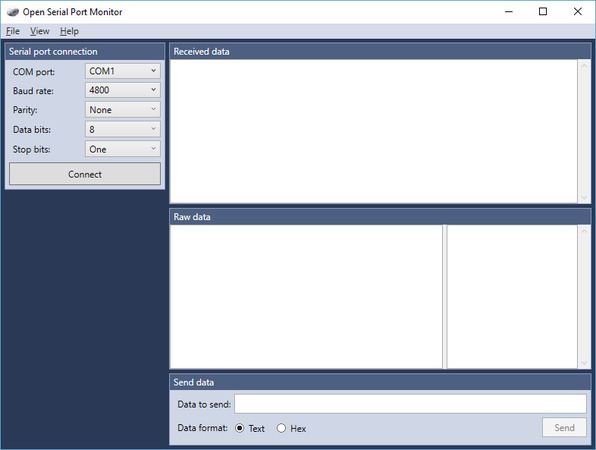
Key Free Version Features
- Offers a straightforward and lightweight tool that focuses on connecting and receiving data
- Supports standard serial parameter configuration, such as baud rate, stop bits, parity, and more
- Runs on .NET Framework 4.5
Key Limitations in the Free Version
- Basic Monitoring Only: Displays incoming data from a serial port, without advanced features like protocol decoding or multi-port support.
- No Port Sniffing: Cannot intercept or monitor ports already in use by other applications.
- Single Session Focus: Supports only one serial connection at a time, with no multi-port management.
- No Logging or Export: Does not provide built-in logging, session playback, or export options.
- Outdated: Last updated in 2016, with no active development or updates since then.
Use Cases
- Best suited for lightweight viewing scenarios that don’t require sniffing ports used by other applications
- Educational use and quick device checks, where simplicity is more important than advanced features
- Ideal for teams that favor open-source utilities for auditability and transparency
Comparison Table
| Feature |
Free Serial Port Monitor |
YAT |
HHD Free Serial Analyzer |
SerialTool (FREE) |
Open Serial Port Monitor |
| Best For... |
Simple data logging |
Professional debugging |
Intercepting in-use ports |
Cross-platform dev |
Minimalist viewing |
| Can Sniff Busy Port? |
No |
No |
Yes (Kernel-level) |
No (Paid only) |
No |
| OS Support |
Windows |
Windowss |
Windows |
Win/macOS/Linux |
Windows |
| Primary Limitation |
Basic features only |
Windows only |
20 min sessions |
Heavy feature caps |
No longer updated |
| Protocol Decoding |
None |
ASCII/Hex/Custom |
Low-level IOCTL |
Modbus (Limited) |
None |
| License Type |
Open Source (PRO paid version available) |
GPL (Open Source) |
Limited Freemium
(PRO paid version available) |
Freemium
(PRO paid version available) |
GPL (Open Source) |
Conclusion
Among the available options, Free Serial Port Monitor by Electronic Team stands out as the most well-rounded choice for most users. Unlike other free tools that impose time, session, or feature limits, it is completely free with zero restrictions. Additionally, it supports up to 256 ports and delivers a clean, reliable interface, which is ideal for data logging and everyday monitoring.
Competing tools tend to focus on narrower use cases, such as driver-level port sniffing (HHD Free Serial Analyzer), cross-platform compatibility, or specialized protocol decoding. This makes them better suited for specific scenarios.
For users looking for a straightforward and no-cost serial monitoring solution without artificial limitations, Free Serial Port Monitor clearly leads the field.
#1 at Serial Port Software
Log and analyze serial port activity
4.8 rank based on
345+ users
(Learn more)
Get a download link for your desktop
Submit your email address to get a link for quick download on your desktop and get started!
or